Client project · AI product design

AydoneAI-powered commitment management

Danny Wilson runs several ventures, travels to meetups around the world and has a newborn at home. He kept losing track of what he'd promised, and asked for a tool to fix that. Aydone finds the commitments hidden in your conversations and turns them into ones you can track, delegate and close.

Client
Danny Wilson, founder
My role
Product designer · MVP UX
Platform
iOS · mobile first
Status
MVP in development

The problem

Promises are made in conversations, then lost there

Danny WilsonFounder · client and first user
Several ventures and startupsMeetups around the worldA newborn at home
What Danny told us
  • He loses track of his promises, often.
  • It's hard to remember everything he's agreed to.
  • He's often too busy to write things down when he makes them.
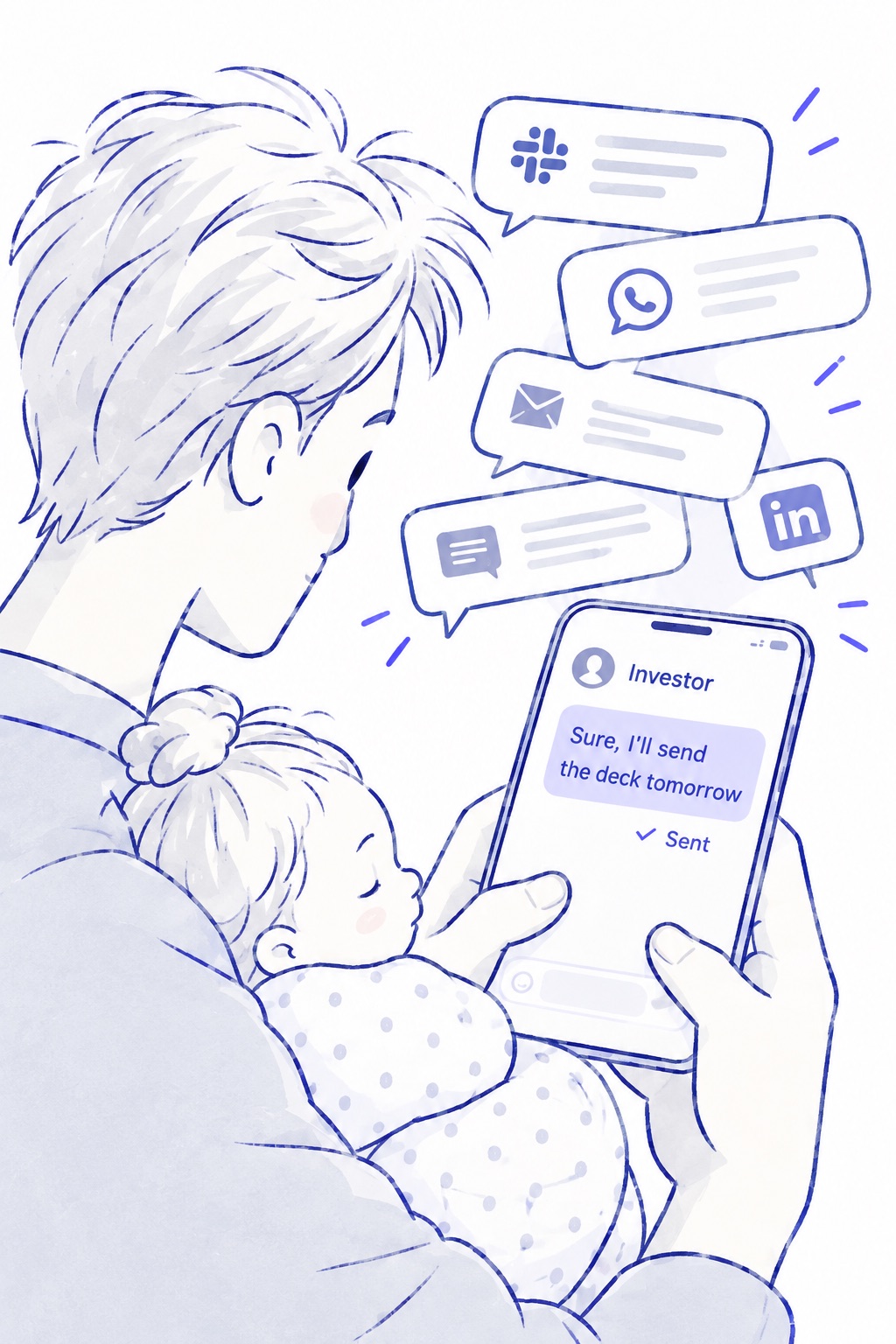
Illustration: over Danny's shoulder, he holds his sleeping newborn daughter in one arm and types to an investor with the other hand: “Sure, I'll send the deck tomorrow”, marked Sent. Notifications from Slack, WhatsApp, email and LinkedIn pile up around the phone.
1 · The promise. Sent between feeds, then buried under the next twenty messages.

Promises like these are made in passing, in whatever app the conversation happens to be in:

WWhatsApp · Tue 18:42

Sounds good. I'll send you the numbers tomorrow after the board call.

Not tracked anywhere
SSlack · #product

Re the pricing question, I'll speak to Sarah and come back to you.

Not tracked anywhere
MEmail · Partnership terms

Thanks for the draft. I'll check with the legal team and get back to you this week.

Not tracked anywhere
●Meeting · Weekly sync

Not ready yet. Let's revisit this next week once we have the data.

Not tracked anywhere
TTelegram · Investor group

Happy to help. I'll intro you to our CTO as soon as I get her contact.

Not tracked anywhere
inDM · LinkedIn

Great meeting you. I'll share the case study deck on Monday.

Not tracked anywhere

The problem isn't only information overload. Conversations are full of commitments, and every productivity tool expects you to spot them and write them down yourself.

A to-do app only knows about what you type into it. Most promises are made in the flow of a conversation, like a reply sent between meetings or a “sure, I'll do it” on a call. Remembering them is left to human memory, and that is the part that fails first under pressure.
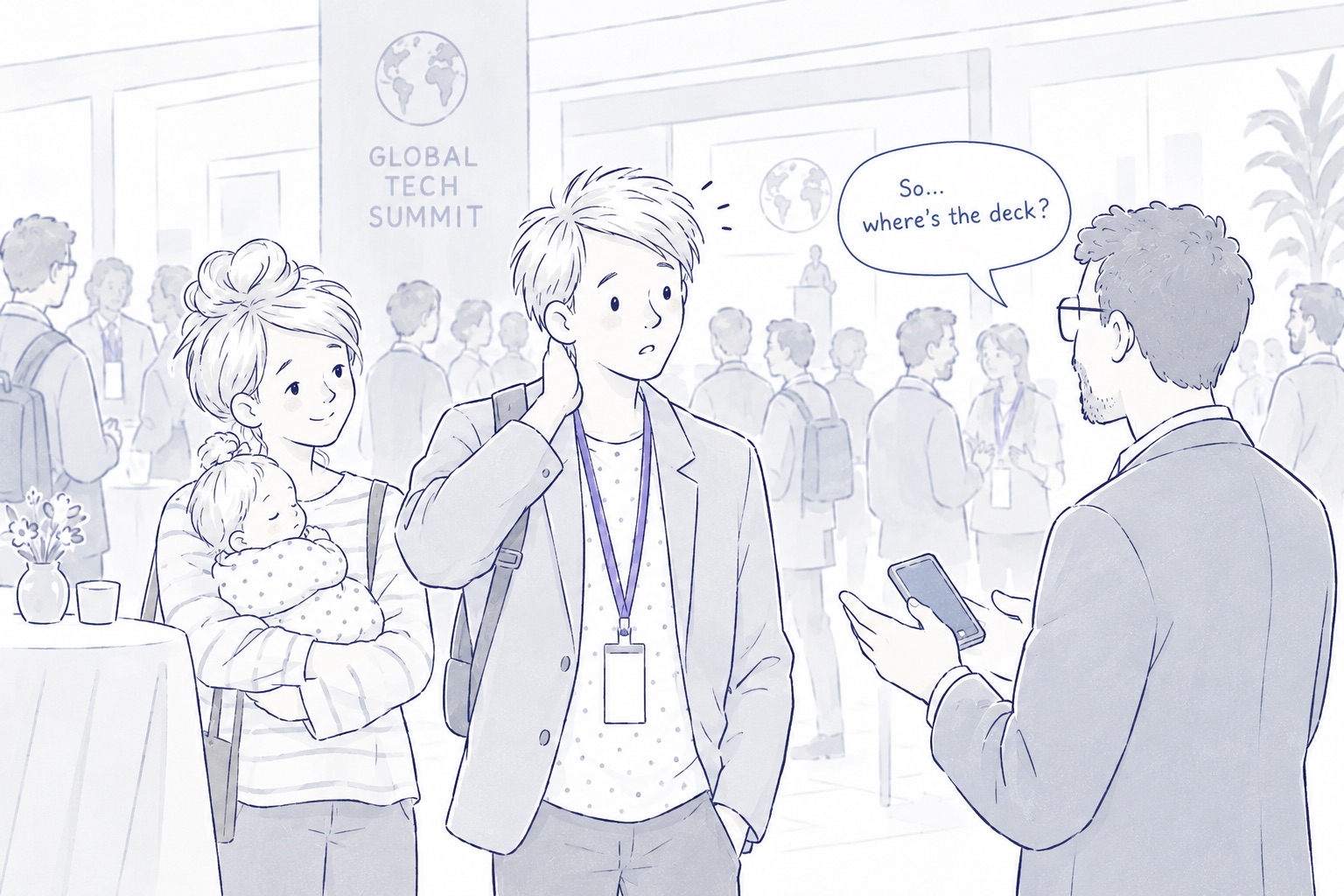
Illustration: days later at a busy Global Tech Summit, an investor holding a phone asks Danny “So… where's the deck?”. Danny rubs the back of his neck, caught off guard, while his wife stands behind him holding their sleeping baby.
2 · The miss. Days later, at a summit abroad, the investor asks for the deck. Danny had forgotten. Nothing had reminded him.

Danny isn't the only one

Desk research shows how fragmented communication has become for anyone who works across many channels.

2 min

Average gap between interruptions by a meeting, email or chat during core hours

117

Emails the average Microsoft 365 user receives per day

153

Teams messages per day, with after-hours chats up 15% year on year

~1 in 2

Employees and leaders who say work feels chaotic and fragmented

SourceMicrosoft Work Trend Index, “Breaking down the infinite workday” (2025). Aggregated, anonymised Microsoft 365 signals.
CauseCommunication overloadMany channels, constant pings
EffectFragmented attentionInterrupted work is faster but more stressful (Mark et al., 2008). Even an unanswered notification disrupts attention (Stothart et al., 2015).
OutcomeLost commitmentsFollow-through relies on working memory, prioritisation and task initiation, the functions that strain first
Who it's for

Confirmed: founders like Danny, who juggle many relationships and make many small promises a day. Likely, not yet validated: other roles with the same pattern. People with ADHD or other executive-function challenges are one relevant group within that audience, not the whole audience.

Founders · confirmedCEOsManagersConsultantsSalesFreelancersADHD / executive-function challenges

The insight

Traditional productivity tools askWhat tasks did you create?

They start from what the user already noticed and chose to write down. Anything they didn't write down doesn't exist.

Aydone asksWhat did you promise?

It starts from the conversation itself, surfaces the commitments in it, and lets the user decide what happens to each one.

Shaped with the client

From a broad idea to one clear job

Danny came with a broader idea. Over online sessions we brainstormed it down to the problem he felt most: the promises he kept losing. Then we walked through every step and stage of the flow together.

  1. StartA broad idea

    Danny's first brief, wider than promises alone

  2. BrainstormFind the real pain

    Online sessions and chats about his week: ventures, travel, family

  3. FocusPromises, not tasks

    The job narrowed to catching commitments he never wrote down

  4. Walk-throughEvery step and stage

    Each flow reviewed with Danny as the first user

  5. NowMVP in development

    Product and AI model being built

Danny's idea

Sort incoming promises like an Eisenhower matrix

When we were working out how to sort incoming promises, and what would feel easiest, Danny suggested the Eisenhower decision matrix: do it, schedule it, delegate it, or drop it. We kept its four outcomes and made each one a single action on the Decide card.

  • One tap, not two judgements. Instead of rating urgency and importance, you choose the outcome directly.
  • Schedule became Snooze. Pick when the promise comes back.
  • Delete became Archive. Nothing is lost: archived promises stay in History as FYI.
Solved together

What happens when one subject holds many promises?

One investor intro can produce several promises: follow up with Boyko, get the CTO's contact, answer the CTO's question. As a flat list they lose their connection, but grouped into one item they disappear from Today. We solved it with a parent–child model, and Danny liked it enough that it went straight into the UX.

  • Topics are parents, promises are children. Related promises are grouped under one topic, such as “Investor intro”.
  • Promises live on their own in Today. Each one can be done, snoozed or delegated without opening its topic.
  • The topic gives the bigger picture. The topic chip on any card opens every person and promise in that situation, including blockers like “needs CTO contact first”.

The product hypothesis

If AI does the noticing and Danny only confirms, fewer promises fall through the gap between a conversation and a to-do list.

Today

Memory does the work

  1. Communication
  2. Information
  3. Human memory
  4. Forgotten commitment
Traditional productivity

The user does the work

  1. Communication
  2. User recognises a task effort
  3. Manually creates it effort
  4. Task manager
Aydone

AI notices, the user decides

  1. Communication
  2. AI detects commitment
  3. User confirms one tap
  4. Commitment is tracked

The product

Decide, act, hand off, close

Four screens carry the core loop. It's designed mobile first because that's where Danny's day happens: between meetings, while travelling, with a baby in one arm. Chat apps like WhatsApp and Telegram, where many of his promises are made, live on the phone too.

Illustration: the same summit with Aydone. Danny smiles beside his wife, holding their sleeping baby. His phone shows the investor's message “Thanks for the deck!” and a Decide card, Send the deck, with his thumb on the Today button.
3 · With Aydone. The promise became a Decide card the moment he sent it. One tap put it on Today, and the deck went out on time.
Decide

Triage what the AI found, one card at a time

New commitments arrive as a short queue. Each card quotes the original message, so the AI's reading can be checked against the words.

  • Source quote with the detected phrase highlighted
  • Missing details flagged, such as “When: not mentioned”, instead of guessed
  • Progress through the queue, so triage has a visible end
Gestures on a card Every swipe has a button twin
Swipe rightMoves the promise to Today
Do today
Swipe leftKeeps it in History as FYI
Archive
Tap SnoozePick when it comes back
Snooze
Tap DelegateOpens the delegate sheet
Delegate
Tap UndoReverses the last decision
Undo

The first sketch also mapped swipe up to Snooze and swipe down to Delegate. They were dropped because vertical swipes clash with scrolling and iOS system gestures.

Decide
Today

Only what needs you now

Today shows active commitments, filtered by area of life. Every card has the same anatomy (topic, status, source and people), so a glance is enough.

  • Categories separate Work from Home without switching apps
  • Status chips pair colour with a text label
  • The Decide tab badge counts what's still waiting for a decision
Today
Promise detail → Delegate

The whole story behind a promise, and a clean handoff

Opening a promise shows who it was made to, the topic, where it started and the original words. Delegating opens a sheet on the same screen, so the context stays visible while you choose who takes it.

  • Topic link opens everyone and everything in the same situation
  • Mark done is the main action, with Snooze and Delegate beside it within thumb reach
  • Suggestions come from the topic's participants, and the AI assistant can take a promise too
  • Nothing disappears: the promise moves to Delegated, where you can nudge or take it back

Scroll the flow sideways →

Promise detail
Tap
Delegate
Delegate sheet
Moves to
Delegated
Delegated
Context and memory

Topics hold the bigger picture, History holds the past

A topic groups every person and promise in one situation, so blockers such as “needs CTO contact first” are visible. History keeps what's finished searchable, and labels who closed each promise: you, a colleague or the AI assistant.

Scroll sideways →

Topic full view
History

About Ask AI

The centre tab opens the AI assistant, first sketched as “Ask me”. Its conversation design is out of scope for this case study. Here the assistant appears only as a delegate that drafts work for your review.

Why Decide comes first

Danny is often too busy to write things down. Decide asks for one tap per promise instead, so capturing a commitment costs less than forgetting it.

AI interaction

When the AI steps in, and when you do

The AI works at five moments in a promise's life. Each is started by something specific: a new message, your decision, or a due date. Between them sit the two moments that belong to you.

Phase 1 · CaptureFrom a message to a confirmed commitment
Source01Message arrives

WhatsApp, email, Slack or a meeting note in a connected account

AI02Detect

Flags phrases like “I'll send…” or “let me check…”

Trigger · new message
AI03Extract and label

What, to whom, where from and when. Each detail is marked stated, inferred or missing

You04Decide

Do today, delegate, snooze or archive. “Not a promise” dismisses it. Nothing is tracked before this

Screen · Decide
Phase 2 · Act and closeFrom a confirmed commitment to a closed loop
AI05Link and suggest

Groups it with its topic and people, and suggests who could take it

Trigger · your decision
AI06Draft the work

Prepares it, for example an investor summary

Only if delegated to AI
You07Review the draft

Approve, edit or reject. Nothing is sent before this

Only if delegated to AI
AI08Follow up

Reminds you when it's due, nudges a delegate, and brings snoozed items back

Trigger · date or silence
You09Close

Mark it done. History records who closed it: you, a colleague or the AI

Screen · History
AI never
Tracks a promise you haven't confirmed
Sends a message or draft without your approval
Guesses a missing date. It asks you instead
Hides its source. Every suggestion quotes the words

Anatomy of a detection

From messageStated in the words InferredAI's reading, underlined Ask youA gap the AI won't guess

RefinementThese three labels are a refinement proposed in this case study. They build on the Decide card and the review cards in the system map.

Show the evidence

Every suggestion quotes the words it came from, so people judge the source rather than a summary of it.

Separate what was said from what was guessed

Stated facts, inferences and gaps look different. There are no percentage scores. People understand “inferred” better than “72% confident”.

Make correction cheap

Any field can be edited in place. “Not a promise” dismisses a false positive in one tap, with nothing to explain.

Hand over ownership clearly

Once confirmed, the item is the user's commitment and the AI label disappears. Work the AI does as a delegate returns as “Needs review” and shows as “Done by AI” in History.

Process

Paper first, pixels later

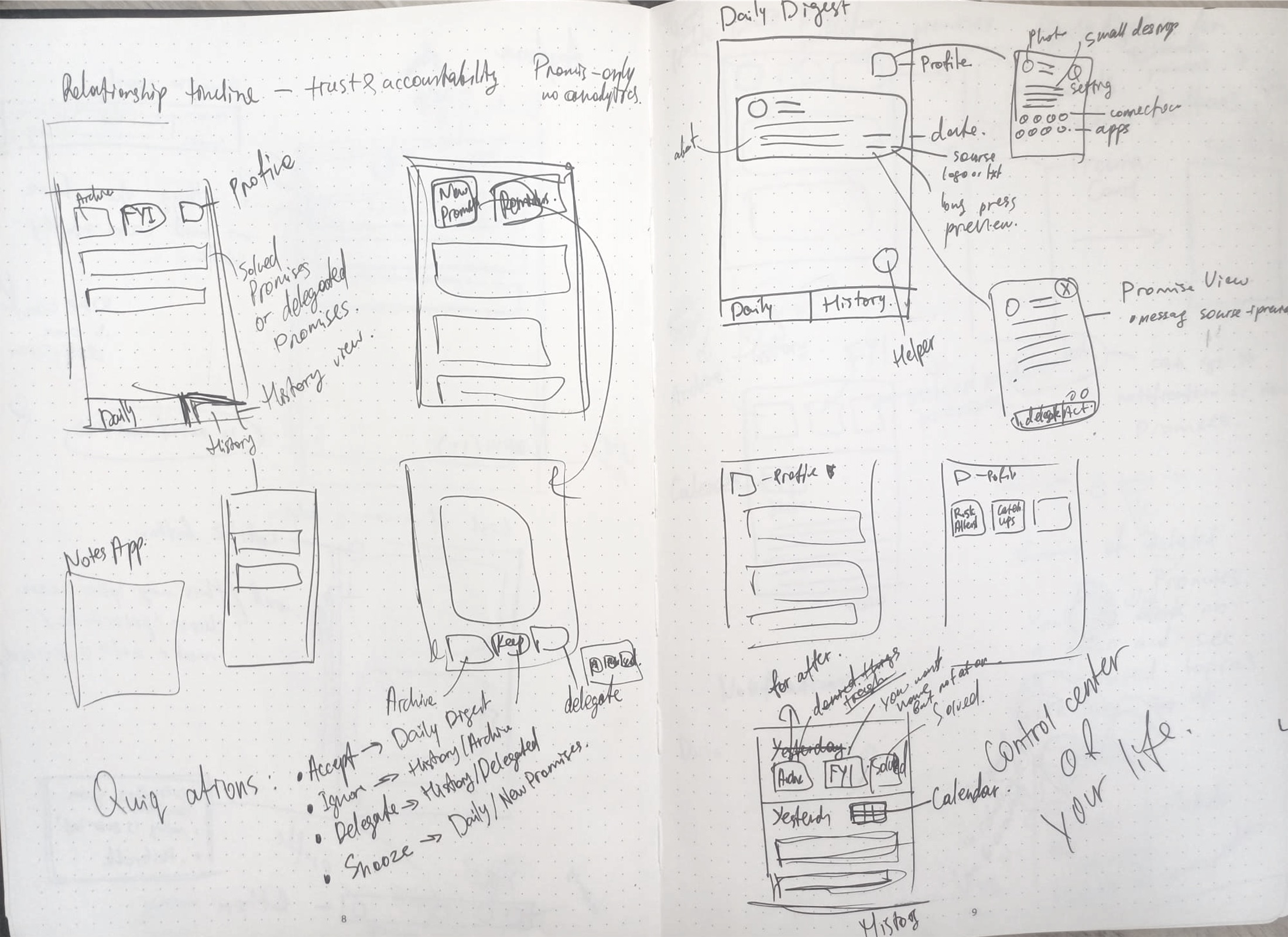
Aydone was worked out in a dotted notebook before any wireframe. Three moments from it: a wide first pass, the model that held the product together, and the screens that came out of it. Select any page to read it full size.

01

Explore: many layouts, no rules yet

The first pass put two tabs, a notes-style list, profile tiles and a history view on one spread. The ideas were wide on purpose; the constraints came later.

  1. “Promises only, no analytics”A boundary written on the first page.
  2. Two tabs: Daily and HistoryThe first navigation. It grew to five tabs, with Ask AI in the centre.
  3. Long press to previewA promise and its source message, opened without leaving the list.
  4. Four quick actionsAccept, Ignore, Delegate, Snooze. They became the four exits of Decide.
  5. “Control center of your life”The first framing. With Danny it was narrowed to one job: promises.
02

Model: three surfaces, one promise

Before drawing more screens, the notebook defined where a promise lives. Each surface answers one question, so no single screen has to do everything.
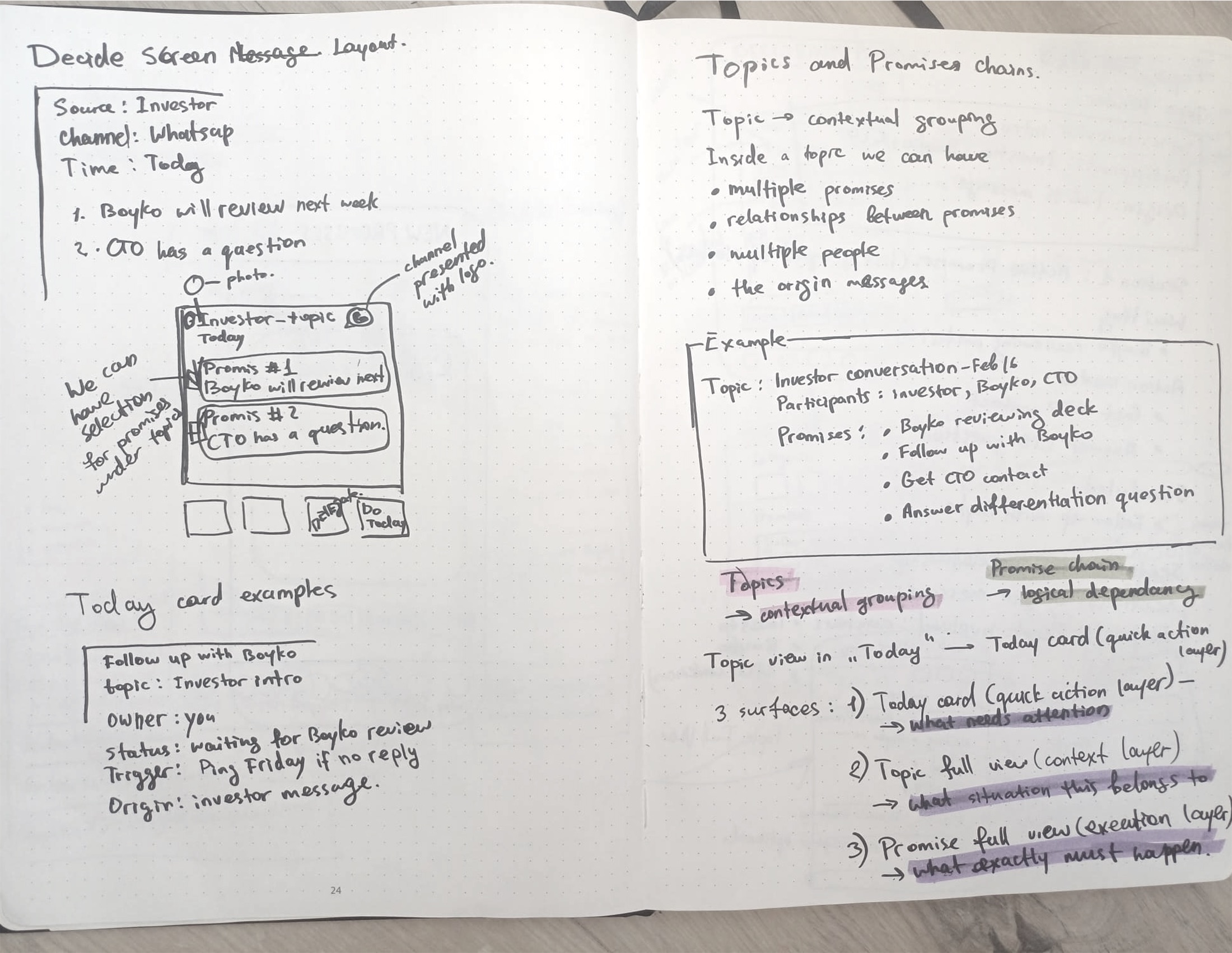
Handwritten notes with purple highlighter: Topics are contextual grouping, promise chains are logical dependency. Three surfaces: Today card, the quick action layer, what needs attention; Topic full view, the context layer, what situation this belongs to; Promise full view, the execution layer, what exactly must happen.
  1. Quick action layerToday card

    What needs attention

  2. Context layerTopic full view

    What situation this belongs to

  3. Execution layerPromise full view

    What exactly must happen

Topics group promises by context. Promise chains link promises that depend on each other.
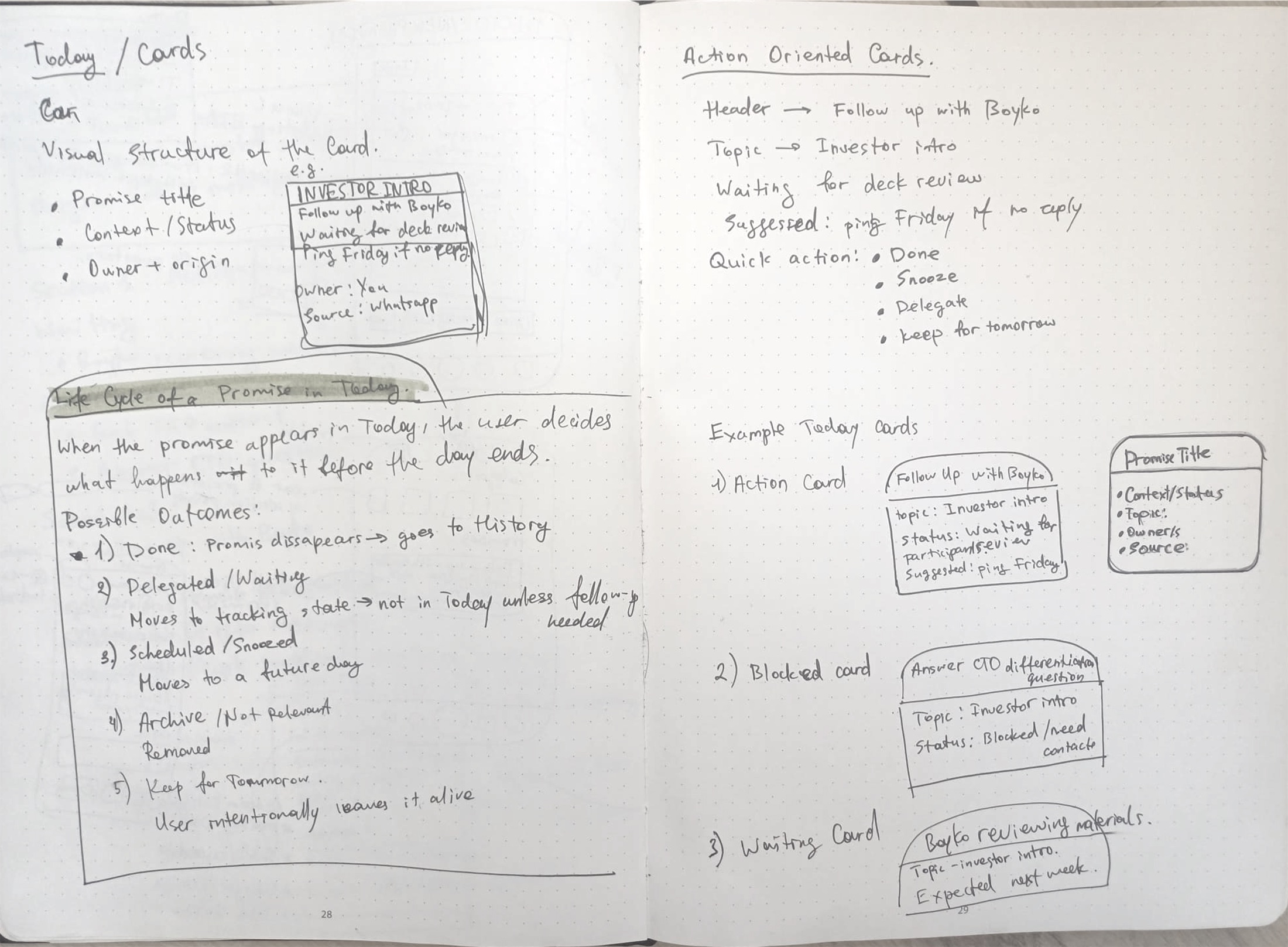
Handwritten “Life cycle of a promise in Today”: when a promise appears in Today, the user decides what happens to it before the day ends. Possible outcomes: done, delegated or waiting, scheduled or snoozed, archived, kept for tomorrow.

Before the day ends, every promise gets a decision

  • DoneLeaves Today and goes to History
  • DelegatedTracked elsewhere; back in Today only if a follow-up is needed
  • SnoozedMoves to a future day
  • ArchivedNot relevant, removed
  • Kept for tomorrowThe user keeps it alive on purpose
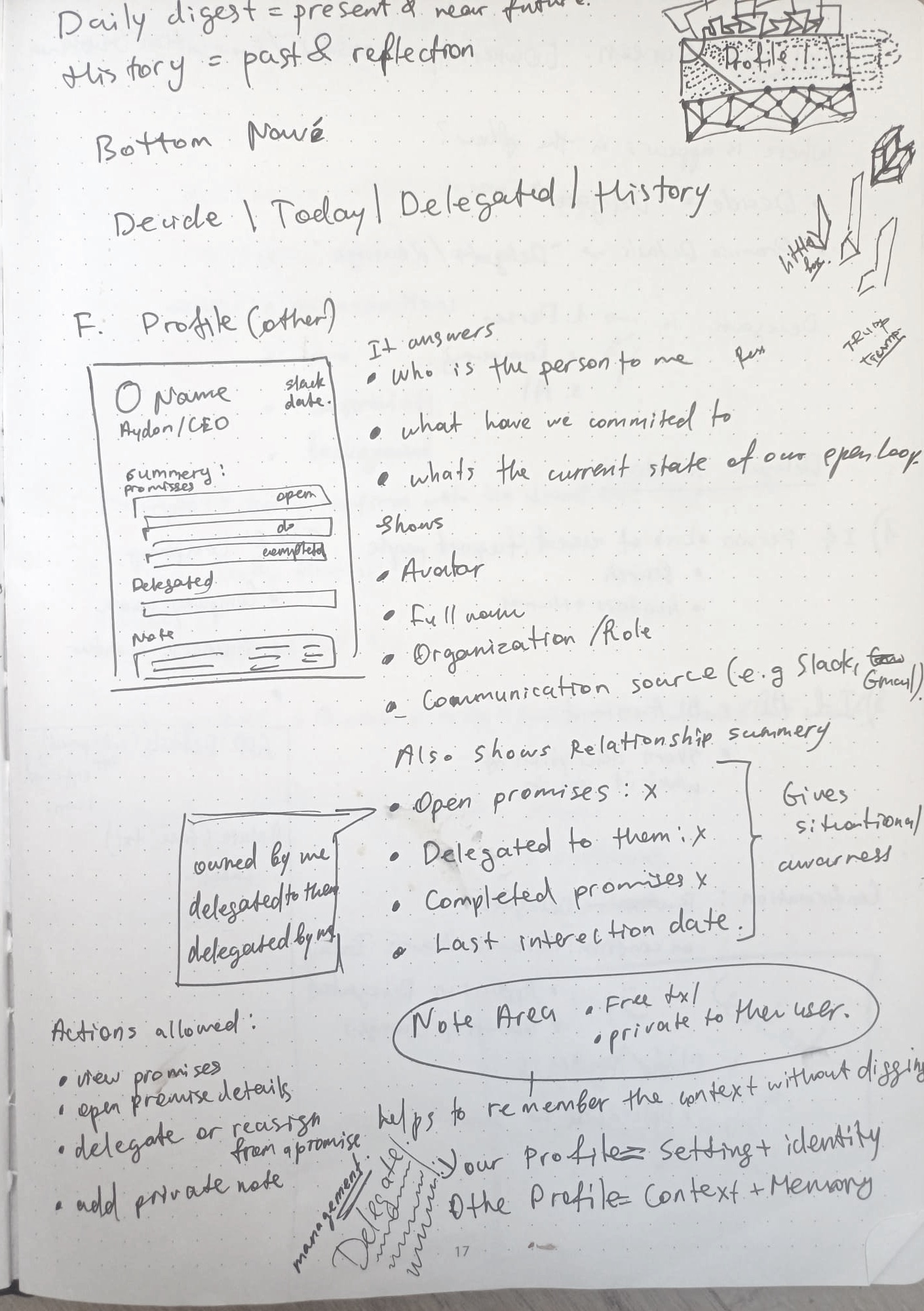
Handwritten notes: Daily digest = present and near future, History = past and reflection; bottom navigation Decide, Today, Delegated, History; and a sketch of another person's profile. It answers: who is the person to me, what have we committed to, what's the current state of our open loops.

Time and people, defined on one page

  • TodayThe present and near future
  • HistoryThe past, for reflection
  • Your profileSettings and identity
  • Someone else'sContext and memory: who they are to you, what you've committed to, which loops are still open

In the final design, the people side lives in the Topic view: who's involved and what's still open.

03

Converge: from page to screen

Each core screen went from a notebook page to a low-fidelity wireframe for review with Danny, then to the final design.

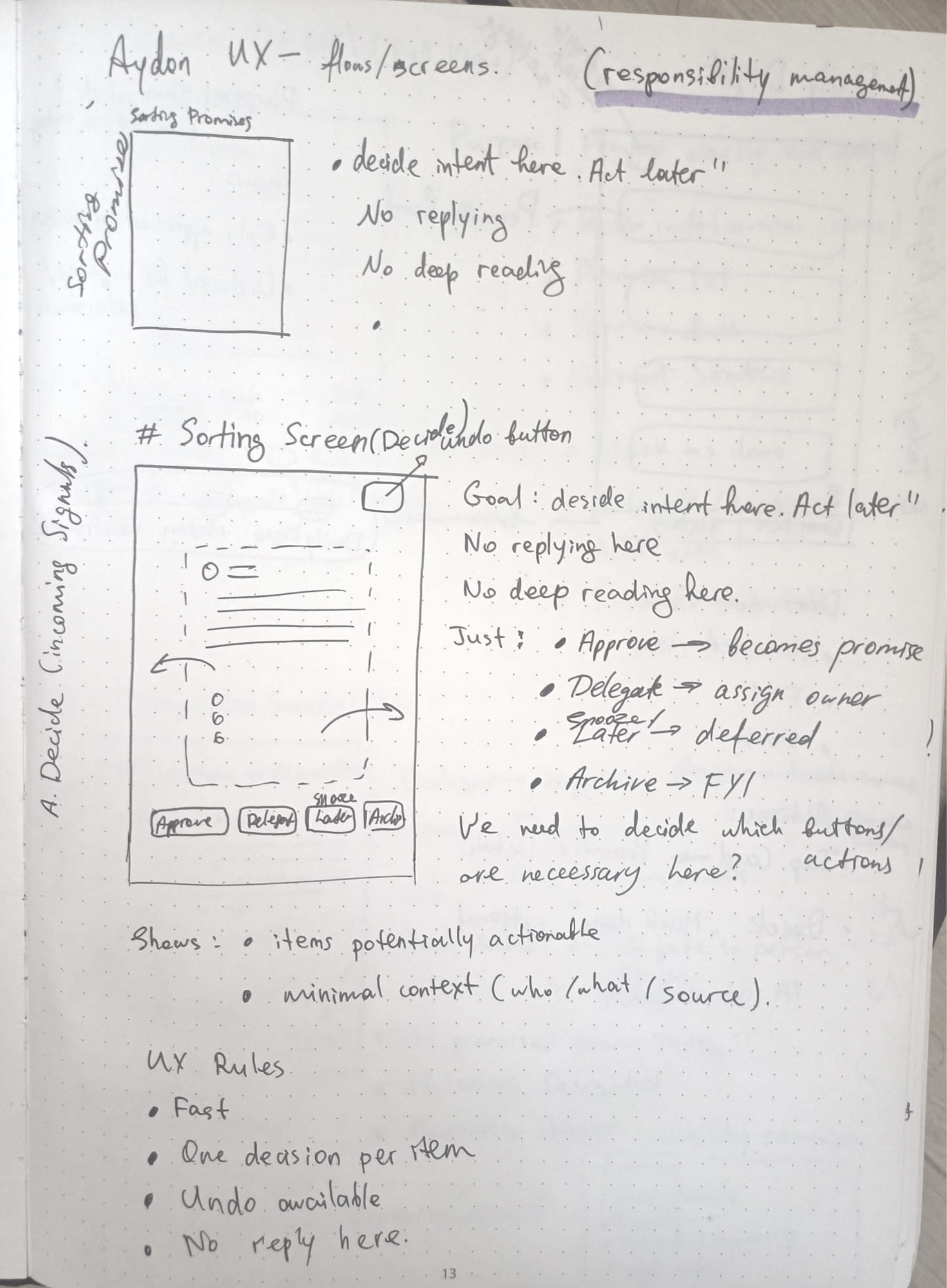
Screen · Decide

“Decide intent here. Act later.”

The first sketch set rules before layout: be fast, one decision per item, undo always available, no replying from here. Those rules survived every iteration.

  • A source quote was added so people can check the AI's reading
  • Gestures were reduced to left and right swipes, each with a button twin

Swipe to compare →

Hand sketch of the sorting screen: a card with swipe arrows, an undo button and Approve, Delegate, Later and Archive buttons. Notes: decide intent here, act later; no replying here; no deep reading here.
SketchRules before layout
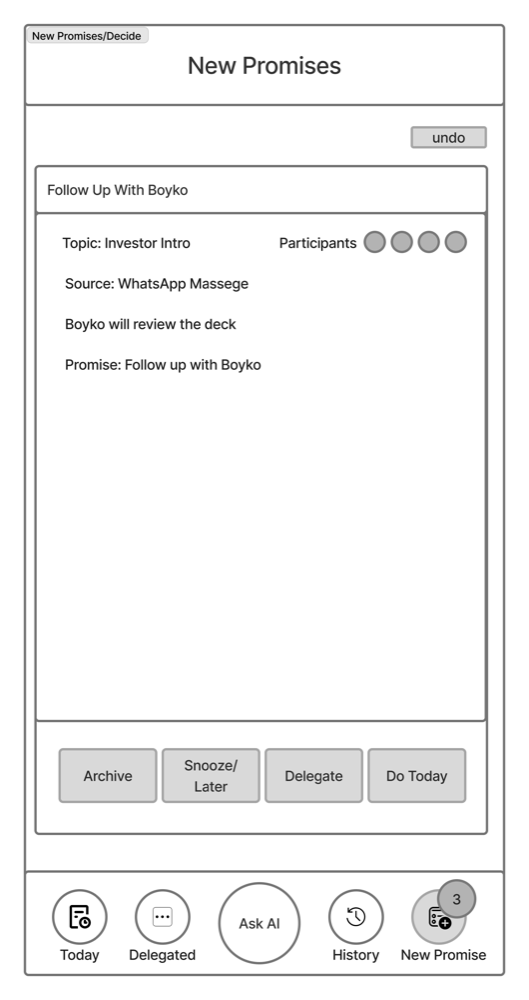
Low-fidelity wireframe of New promises: one card with topic, participants, source and the promise, and Archive, Snooze, Delegate and Do today buttons.
WireframeOne card, four exits
FinalSource quote, queue progress, flagged gaps
Screen · Today

Mapping the anatomy of a promise

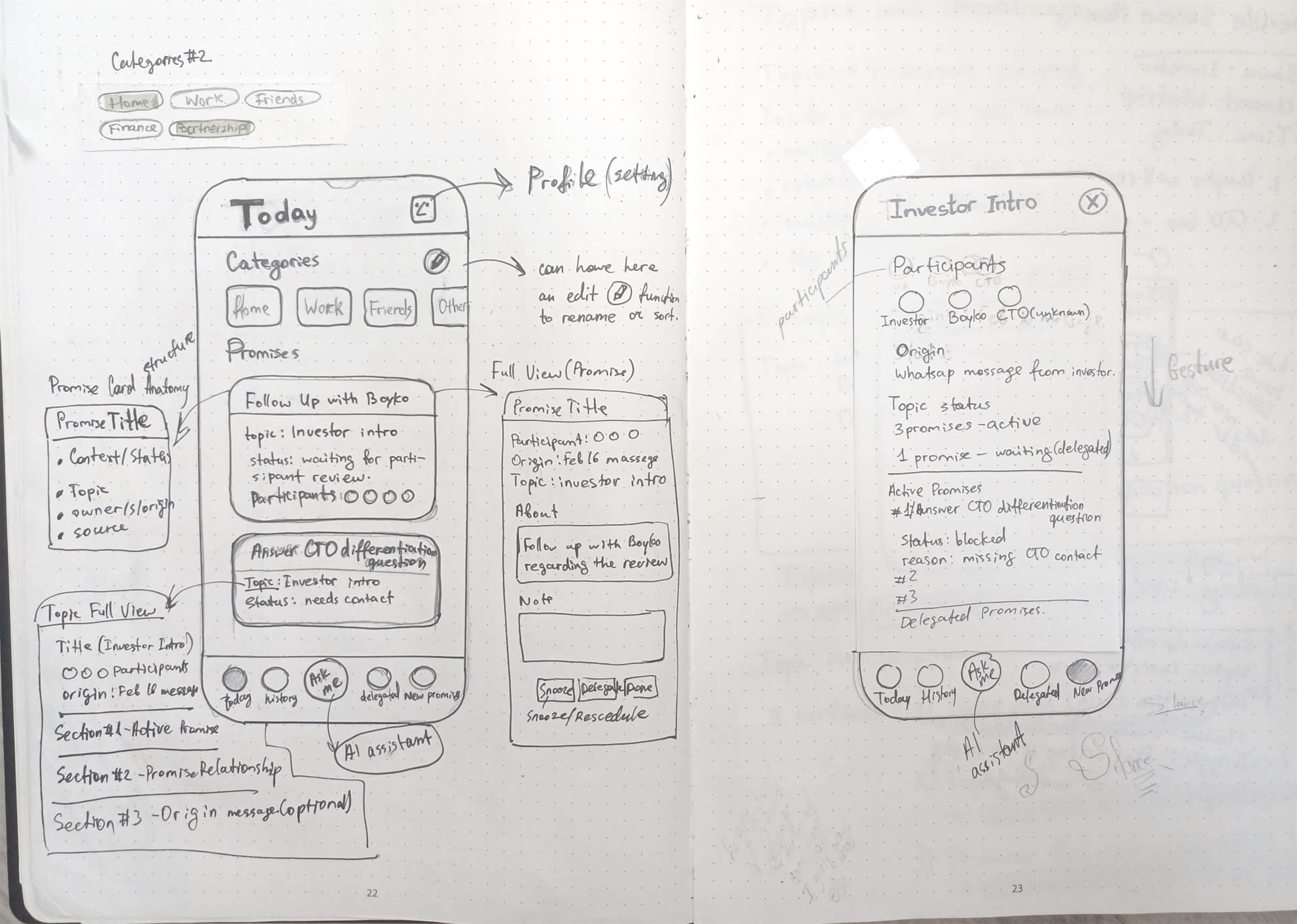
The Today sketch worked out what a promise card needs: title, topic, status, source and participants, always in the same order, with the topic and promise views one tap away.

  • Status became a chip with a dot and a label, not colour alone
  • Categories gained icons and a clear selected state

Swipe to compare →

Hand sketch of the Today screen with categories and two promise cards, annotated with the promise card anatomy, the topic full view, the full promise view and the Ask AI assistant in the tab bar.
SketchCard anatomy and navigation
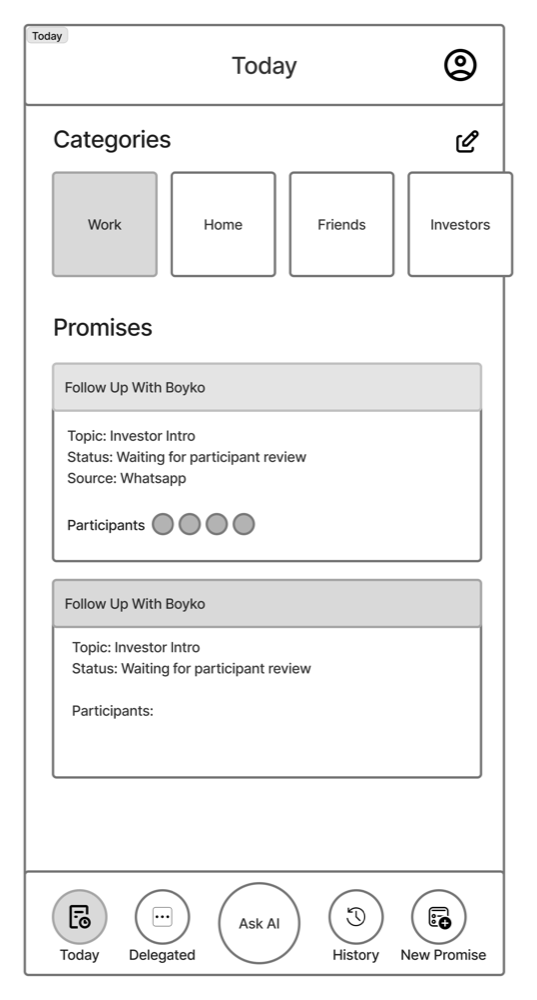
Low-fidelity wireframe of Today: category tiles, two promise cards and a five-item tab bar with Ask AI in the centre.
WireframeStructure and tab bar
FinalChips, icons, clear hierarchy
Flow · Delegation

“Ownership changes, visibility remains.”

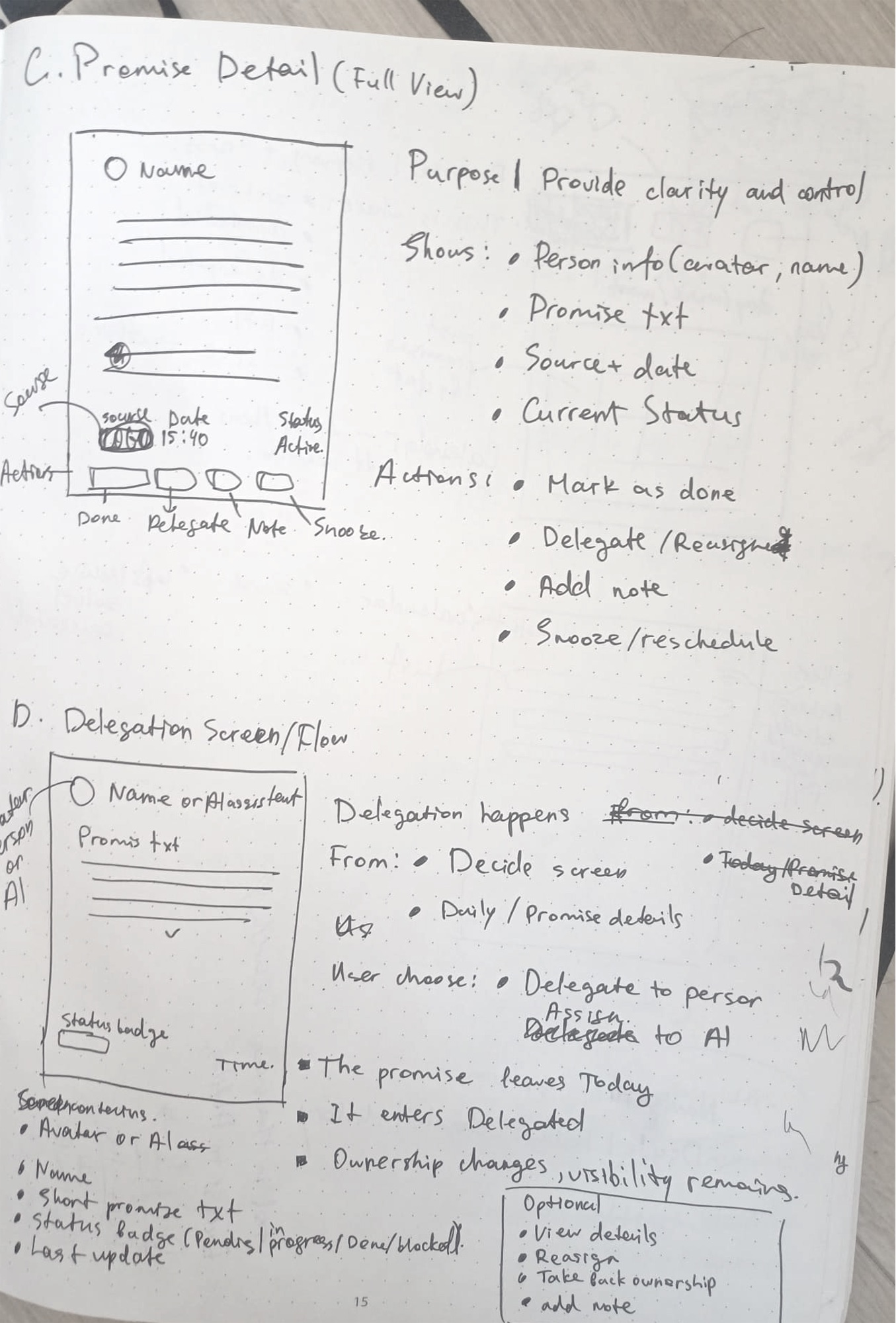
A note in the delegation sketch became a product rule: a delegated promise leaves Today but never leaves your sight.

  • The AI assistant can be chosen as a delegate, alongside people
  • AI drafts return as “Needs review” and are never sent silently

Swipe to compare →

Hand sketch of the delegation screen. Notes: delegation happens from the Decide screen or the promise details; the user chooses a person or the AI assistant; the promise leaves Today, it enters Delegated, ownership changes, visibility remains.
SketchOwnership as a state change
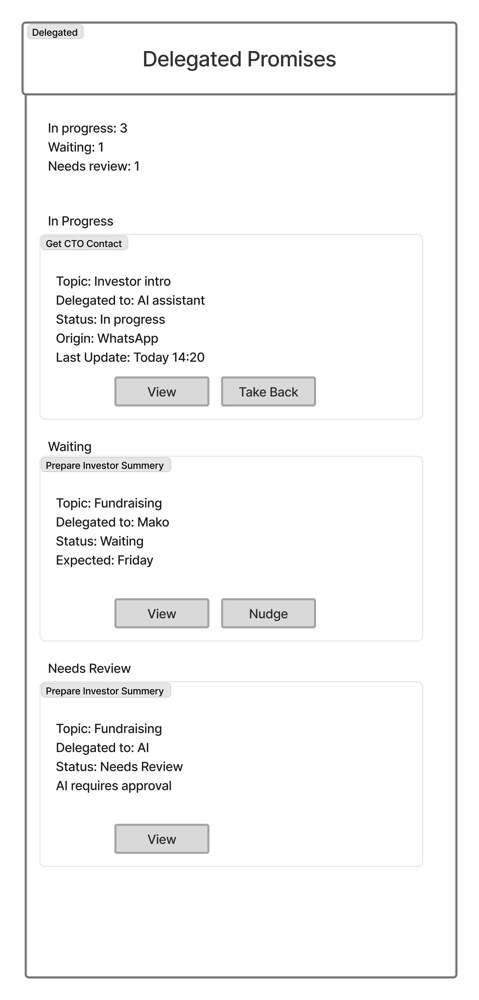
Low-fidelity wireframe of Delegated promises grouped into In progress, Waiting and Needs review.
WireframeGrouped by state
FinalCounters and grouped states

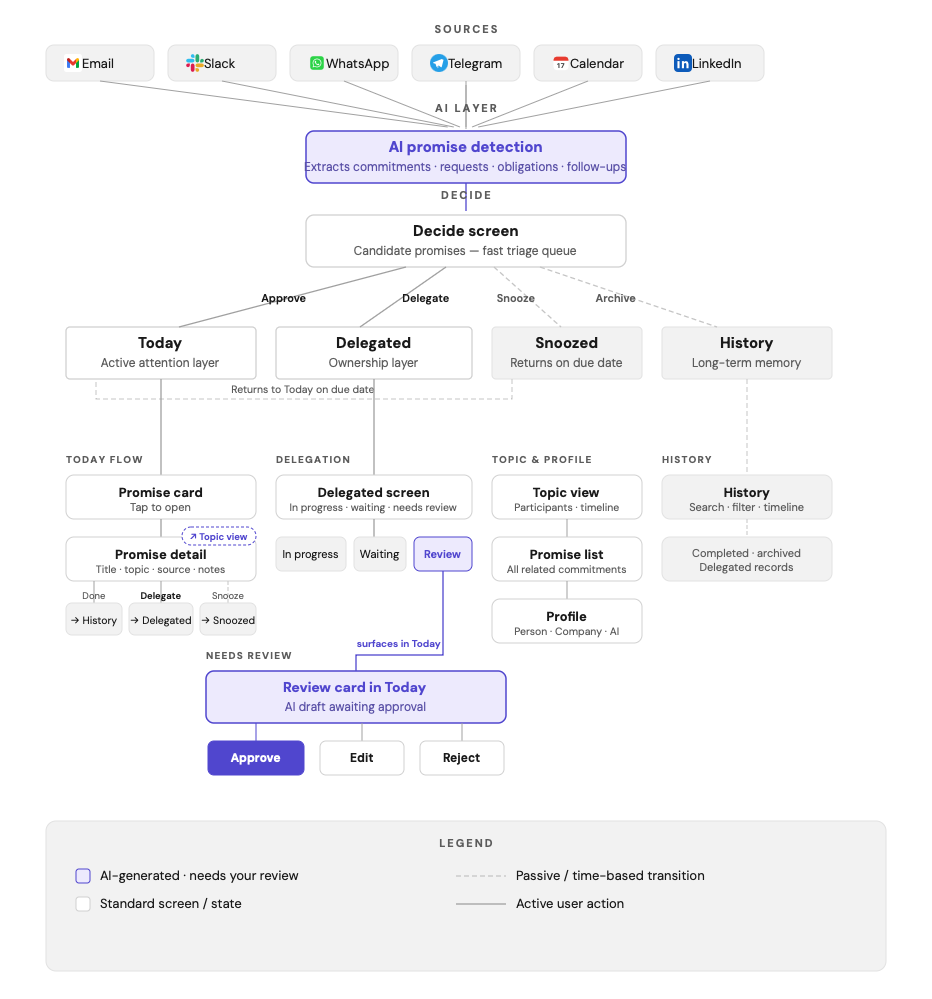
How a promise moves through Aydone

Drawn to walk Danny through the whole product. Anything the AI produces (purple) passes through a human decision.

Messages from

  • Email
  • Slack
  • WhatsApp
  • Telegram
  • Calendar
  • LinkedIn
AI promise detectionFinds commitments, requests and follow-ups in messages
DecideYou triage each candidate: one card, one decision
  • Do todayTodayActive now
  • DelegateDelegatedA person or the AI owns it
  • SnoozeSnoozedBack in Today on its due date
  • ArchiveHistoryDone or archived, searchable

Inside Today

Promise cardPromise detail
thenDone → HistoryDelegate → DelegatedSnooze → Snoozed

When the AI is the delegate

AI prepares a draftReview card in Today
thenApproveEditReject
Nothing the AI drafts is sent without your approval.

View the full system map

UX decisions

Four decisions that shaped the product

01

A commitment is not a task

A task is something you choose to create. A commitment starts in a conversation and involves another person, so every one carries who it was made to, where it came from and the original words.

Task

  • Created by the user
  • Title and due date
  • No origin

Commitment

  • Starts in communication
  • Promised to someone
  • Linked to its source
Trade-off
A richer model than a to-do list, so cards needed a strict, repeatable structure.
02

Context travels with the promise

Every commitment answers five questions without the user opening another app.

What did I promise?Follow up with Boyko
To whom?Boyko · Investor
Where from?WhatsApp · Feb 16
When?After deck review
Status?Waiting for review
Trade-off
More data per item, split between a scannable card and a full detail view.
03

Delegation moves ownership, not visibility

You stay accountable for a promise you made, even after passing on the work. A delegated promise moves to Delegated, where you can nudge the delegate or take it back.

Today→In progress→Needs review→Done
Trade-off
A separate tab to maintain, kept small with summary counters.
04

Close the loop, don't just store it

Today is the present and the near future, and History is the past. Finished promises leave the active views but stay searchable, so lists don't grow forever.

Done by youDone by AIArchivedDelegated
Trade-off
Archiving has to feel safe, so History search covers promises, people and topics.

Design system

One card anatomy, one set of states

The app uses Geist with an indigo accent, and every repeated element is one reusable component. This page shares the same accent so the two read as one piece of work.

Promise card anatomy

  1. Title is the promise in plain words
  2. Topic links to the full situation
  3. Status is always a dot and a label
  4. Source shows where it was said
  5. Participants show who's involved

The same order is used on the Today, Decide, Delegated, Topic and History cards.

Promise states

WaitingBlocked on someone else
Scheduled · DoneOn track or finished
In progressA delegate is working on it
Needs reviewAn AI draft awaits your approval
Done by AIClosed by the assistant
Not mentioned · AddA gap the AI won't guess

Foundations

Colour

An indigo accent for action and selection, cool neutrals for structure. Semantic tints are kept for status.

Type · Geist

Today 30/700
Section 19/600 · Card title 16/600 · Body 13–14/400 · Tab 11/500

Shape

16 px cards · 14 px tiles · 12 px buttons and inputs · 999 px chips. The Ask AI button uses the same white surface and border as everything else.

Touch

44 px minimum for every tappable control. Primary actions sit in a fixed bar within thumb reach.

Ask AI stays quiet

A white, outlined tab with a slight lift. It's always there, but it never competes with the promises on screen.

Gestures have twins

Every swipe on a Decide card has a button that does the same thing, so nothing depends on discovering a gesture.

One anatomy everywhere

The same card, the same status chip and the same order of details on every list in the app.

Status and next steps

Where Aydone is now

The MVP UX is designed, and the product and its AI model are in development. There are no end users yet, so validation so far has come from Danny, the client and first user, who reviewed every flow as it was designed.

Planned · once a beta exists

Usability test: Decide and Delegate

Who
Danny first, then 5 founders with the same pattern
How
Moderated, 30 minutes, clickable prototype
  1. Triage five detected promises
  2. Spot and correct one wrong detection
  3. Delegate a promise, then take it back

What I'd measure

  • Time per decision in the Decide queue
  • Whether people notice and fix the wrong detection
  • Trust in the AI (1–5), with and without the source quote
  • Swipe or button: which one people actually use

Open questions

  • Privacy: what can be read and stored, and how that's explained
  • Promises made to you: should Aydone track what others owe?
  • Group chats: who owns a promise made to five people?

What I learned

  • In AI products, the most important screen is the one where you check the AI
  • Writing rules before layouts (“no reply here”) kept screens focused
  • A status needs a label as well as a colour. That helps accessibility and trust

An app that helps people keep their word is not only a productivity tool. It helps them keep other people's trust.

Sources

Microsoft WorkLab (2025). Breaking down the infinite workday. Work Trend Index special report.

Mark, G., Gudith, D. & Klocke, U. (2008). The cost of interrupted work: more speed and stress. Proceedings of CHI 2008.

Stothart, C., Mitchum, A. & Yehnert, C. (2015). The attentional cost of receiving a cell phone notification. Journal of Experimental Psychology: Human Perception and Performance.